
How-to: Flashback Data Guard Database
Flashback a Data Guard database
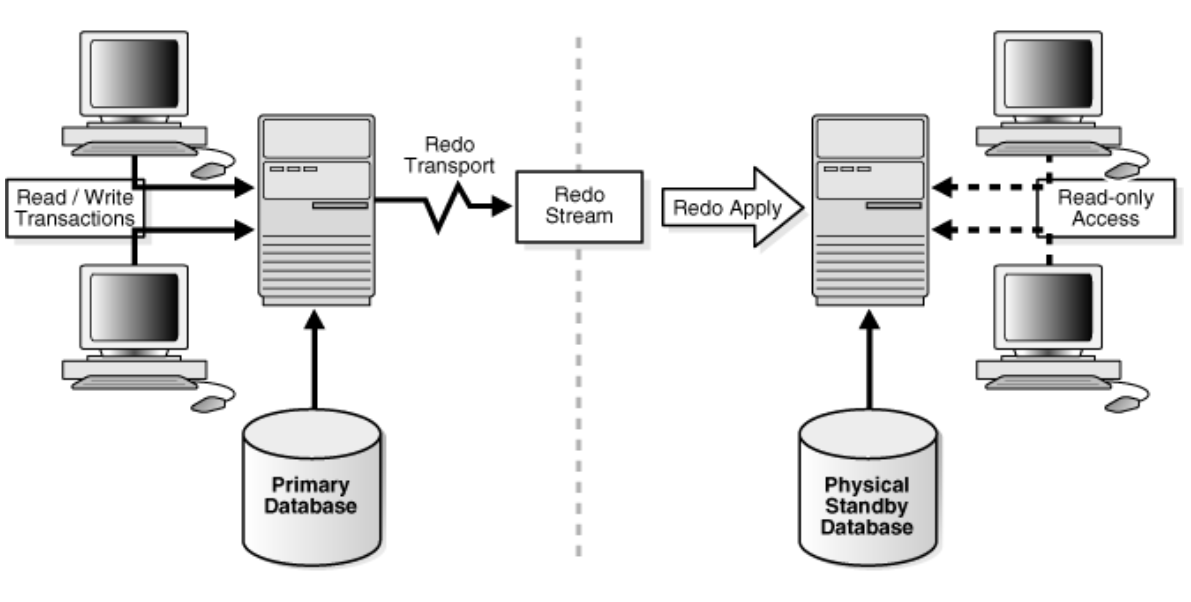
Flash back a primary and its standby databases to a restore point while keeping Data Guard consistent.
Oracle Data Guard managed with the DGMGRL broker
An existing restore point, SYS access to every database, and a short outage window
Primary opened with RESETLOGS, standby back in Active Data Guard, and redo apply in sync
Logical mistake, end of testing cycle, need to rollback database to a previous state? RMAN restore can help, however there’s an easier way: we can address these scenarios with the Flashback technique. In the case of a standalone Oracle database, there is nothing special to take into account when performing flashback. However, performing flashback of a Data Guard environment needs special treatment of the Standby Database to ensure data consistency. This article will show you how to do that
Pre-Flashback Task
Connect to dgbroker to check Data Guard manager state. Expected output should show that the Configuration Status is “SUCCESS”
dgmgrl /

DGMGRL> show configuration;

Configuration - dev100_config

 Protection Mode: MaxAvailability
 Members:
 dev100p - Primary database
 dev100s - Physical standby database

Fast-Start Failover: DISABLED

Configuration Status:
SUCCESS (status updated 48 seconds ago)
Connect to SQLPlus as SYS, then perform a few log switches to ensure primary and standby are in sycn
ALTER SYSTEM switch logfile;
ALTER SYSTEM switch logfile;
ALTER SYSTEM switch logfile;
Run the following sql statement on all standby database(s) and check the last “Difference” column. It expected output is a return of 0, signifying that standby is in sync with primary. If the difference is 1 or 2, you may just have to wait a few minutes for the standby db to catch up.
SELECT ARCH.THREAD# "Thread", ARCH.SEQUENCE# "Last Sequence Received", APPL.SEQUENCE# "Last Sequence Applied", (ARCH.SEQUENCE# - APPL.SEQUENCE#) "Difference" FROM (SELECT THREAD# ,SEQUENCE# FROM V$ARCHIVED_LOG WHERE (THREAD#,FIRST_TIME ) IN (SELECT THREAD#,MAX(FIRST_TIME) FROM V$ARCHIVED_LOG GROUP BY THREAD#)) ARCH,(SELECT THREAD# ,SEQUENCE# FROM V$LOG_HISTORY WHERE (THREAD#,FIRST_TIME ) IN (SELECT THREAD#,MAX(FIRST_TIME) FROM V$LOG_HISTORY GROUP BY THREAD#)) APPL WHERE ARCH.THREAD# = APPL.THREAD# ORDER BY 1;Stop MRP
Once all the standbys are in sync with primary database, stop the mrp process on all the standbys through dgbroker. This is done by connecting to the broker of PRIMARY database server(s) and running the following command.
dgmgrl /

DGMGRL> EDIT DATABASE 'dev100s' SET STATE='APPLY-OFF';
Flashback Database
Flashback can be done in all the databases at the same time. First bounce the database and put it in mount mode. In the example below, I’m flashing back to a RESTORE POINT named BeforeDeploymnent.
shu immediate
startup mount;
flashback DATABASE TO restore point BeforeDeploymnent;
Open Resetlogs Database (On Primary)
Once flashback is done in all the databases, proceed with opening the primary database first before starting starting the mrp on all the standby’s.
ALTER DATABASE OPEN resetlogs;Open Read Only Database (On Standby)
Wait for primary database(s) to complete flashback and open resetlogs before proceeding with opening the standby.
ALTER DATABASE OPEN READ ONLY;Start MRP
Start the mrp on all standbys using dg broker. This is done by connecting to the broker of PRIMARY database server(s) and running the following command.
dgmgrl /

DGMGRL> EDIT DATABASE 'dev100s' SET STATE='APPLY-ON';
Post-Flashback Tasks
Connect as SYS on the primary database(s), perform a few log switches
ALTER SYSTEM switch logfile;
ALTER SYSTEM switch logfile;
ALTER SYSTEM switch logfile;
Run the following sql statement on all standby database(s) and check the last “Difference” column. It expected output is a return of 0, signifying that standby is in sync with primary. If the difference is 1 or 2, you may just have to wait a few minutes for the standby db to catch up.
SELECT ARCH.THREAD# "Thread", ARCH.SEQUENCE# "Last Sequence Received", APPL.SEQUENCE# "Last Sequence Applied", (ARCH.SEQUENCE# - APPL.SEQUENCE#) "Difference" FROM (SELECT THREAD# ,SEQUENCE# FROM V$ARCHIVED_LOG WHERE (THREAD#,FIRST_TIME ) IN (SELECT THREAD#,MAX(FIRST_TIME) FROM V$ARCHIVED_LOG GROUP BY THREAD#)) ARCH,(SELECT THREAD# ,SEQUENCE# FROM V$LOG_HISTORY WHERE (THREAD#,FIRST_TIME ) IN (SELECT THREAD#,MAX(FIRST_TIME) FROM V$LOG_HISTORY GROUP BY THREAD#)) APPL WHERE ARCH.THREAD# = APPL.THREAD# ORDER BY 1;